

Blog
What is two-factor authentication & should you use it
What is two-factor authentication, and should you use it?
Online security is becoming increasingly important for individuals and businesses. One of the most effective ways to protect online accounts is by using two-factor authentication (2FA).
Many cyber security specialists and IT professionals recommend enabling this feature wherever possible. At ILL IT Solutions in Chadwell Heath (RM6), East London, we often help customers secure their devices, email accounts, and online services by implementing practical security measures such as two-factor authentication.
Understanding Two-Factor Authentication and How It Protects Your Data
Two-factor authentication (2FA) is a security feature designed to provide an extra layer of protection when logging into websites, applications, or online services.
Normally, users access accounts using only a username and password. However, with two-factor authentication enabled, a second verification step is required after entering your password.
This additional step confirms that the person trying to log in is actually the account owner.
When Two-Factor Authentication Is Triggered
Two-factor authentication is commonly required when:
- Logging in from a new phone, tablet, or computer
- Accessing your account from an unfamiliar location
- Using a different web browser
- Attempting sensitive actions such as payments or account changes
Most commonly, the service sends a one-time security code to your mobile phone by text message. You then enter that code to complete the login process.
By requiring this additional verification step, two-factor authentication greatly reduces the risk of unauthorised access to your accounts and personal data.
Why Strong Online Security Matters for Local Businesses
Small businesses increasingly rely on digital systems such as cloud storage, customer databases, email accounts, and online payment platforms. If these accounts are compromised, it can lead to financial loss, reputational damage, and disruption to business operations.
At ILL IT Solutions, a local IT support provider serving Chadwell Heath, Romford, and the wider East London area, we regularly assist customers with improving account security and protecting their devices from cyber threats.
Implementing simple protections such as two-factor authentication can make a significant difference in reducing online risks.
Should You Use Two-Factor Authentication?

In most situations, the answer is yes.
If a service offers two-factor authentication, it is strongly recommended that you enable it. Although not every website currently provides this option, it is worth activating wherever it is available.
Using two-factor authentication helps protect your account even if your password becomes known to someone else.
Passwords can be exposed through:
- Data breaches
- Phishing emails
- Malware
- Weak or reused passwords
With two-factor authentication enabled, a hacker would still need access to the second verification step before gaining entry to your account.
Updating Your Phone Number
If you ever change your mobile phone number, it is important to update any accounts that rely on two-factor authentication.
Mobile numbers are sometimes reassigned after a period of time. If your accounts are still linked to your old number, the new owner of that number could potentially receive your security codes.
Keeping your contact information current helps maintain the security of your accounts.
Are Text Message Codes the Only Form of Two-Factor Authentication?
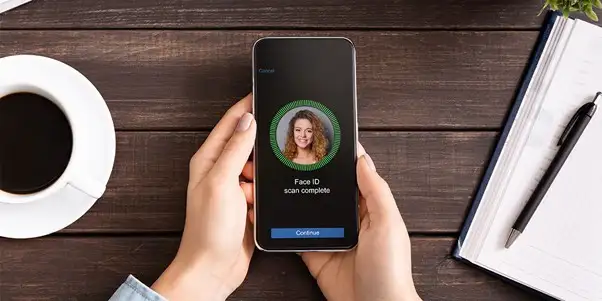
No. While SMS verification codes are widely used, many services support several other authentication methods.
Authenticator Apps
Authenticator applications generate temporary login codes directly on your device.
Popular options include:
- Google Authenticator
- LastPass Authenticator
- Authy
- Okta Verify
These apps produce time-limited security codes that confirm your identity when signing in.
Because the codes are generated on your device rather than sent by text message, they can work even without a mobile signal.
Biometric Verification

Some services allow users to verify their identity using biometric features, including:
- Fingerprint scanning
- Facial recognition
- Iris scanning
These systems rely on unique physical characteristics to confirm that the correct person is accessing the account.
However, it is important to note that some facial recognition technologies have shown vulnerabilities, particularly on older devices.
Hardware Security Keys
Hardware security keys provide one of the most secure forms of authentication.
These physical devices connect to your computer or mobile device and verify your identity during login.
Common examples include:
- YubiKey
- Google Titan Security Key
Hardware keys are widely used by organisations that require higher levels of security.
How to Enable Two-Factor Authentication on Your Account
The process of enabling two-factor authentication can vary slightly depending on the website or service you are using.
In most cases, the option will be located in the security settings or account settings section.
Typical Setup Process
The usual setup process includes the following steps:
- Navigate to your account security settings
- Enable two-factor authentication
- Enter your mobile phone number
- Receive a verification code
- Enter the code to confirm activation
Once enabled, the service may request verification each time you log in, or only when certain conditions are detected.
These conditions may include:
- Logging in from a new device
- Using a new browser
- Accessing the account from an unfamiliar IP address
Some platforms allow you to mark devices or browsers as trusted. However, requiring verification each time can provide stronger protection.
Local IT Support for Online Security
Many people are unsure how to enable security features or may not realise how vulnerable their accounts are.
At ILL IT Solutions in Chadwell Heath (RM6), we help individuals and businesses across Romford, Dagenham, Ilford, and East London secure their computers, online accounts, and digital services.
Services often include:
- Setting up two-factor authentication
- Securing email accounts
- Removing malware and viruses
- Improving password security
- Protecting business devices and networks
What If I Lose My Phone or Hardware Key?
Losing access to your authentication device can make logging into your account difficult. Fortunately, many websites provide backup options.
Using One-Time Backup Codes
Many platforms allow users to generate one-time backup codes.
These codes can be saved or printed and used to log in if your normal verification method is unavailable.
For example, you might store backup codes in:
- A secure password manager
- A printed document kept safely
- Encrypted cloud storage
If you choose to store them online, make sure you can still access them if your phone is lost or if you do not have internet access.
Although setting up backup codes can take a little time, they provide a valuable safety net if you lose access to your authentication device.
Improving Your Online Security
Two-factor authentication is one of the most effective steps you can take to protect your online accounts.
When combined with strong passwords and updated software, it can significantly reduce the chances of unauthorised access.
For individuals and businesses who need help strengthening their cybersecurity, professional support can make a big difference.
ILL IT Solutions, based in Chadwell Heath and serving Romford and East London, helps customers improve their digital security, protect their devices, and resolve IT issues quickly and professionally.
Taking simple steps today—such as enabling two-factor authentication—can help keep your data and accounts safe in the future.
