
How to Recognise an Email Scam
Use the tips below to help protect yourself from fraudsters who attempt to steal personal information or banking details through deceptive emails.
What is an Email Scam?
An email scam, often referred to as phishing, is a form of online fraud where criminals send emails pretending to be from trusted organisations such as banks, government agencies, or well-known retailers. Their aim is to trick you into revealing sensitive information.
Typically, the email will encourage you to click on a link. This link usually takes you to a fake website designed to look legitimate, where you may be asked to enter personal details such as passwords, banking information, or other confidential data. If you provide this information, it goes directly to the scammer.
In some cases, scam emails may include attachments or links that install harmful software (malware) onto your computer, tablet, or phone. This software can damage your device or allow criminals to access your data.
If you are unsure about an email’s authenticity, do not click on any links or download attachments. Keeping your antivirus software updated and maintaining good online security practices can provide an additional layer of protection.
Signs That an Email Might Be a Scam
Fraudulent emails can sometimes be difficult to identify because they often copy the branding and style of legitimate organisations.
For example, scammers may send emails that appear to come from HMRC, using official logos and formatting to make the message look genuine. These emails are designed to persuade recipients to act quickly, which can make them convincing enough to catch people off guard.
Being cautious and carefully checking the sender, links, and requests for information can help you avoid falling victim to these types of scams.
HMRC scam emails
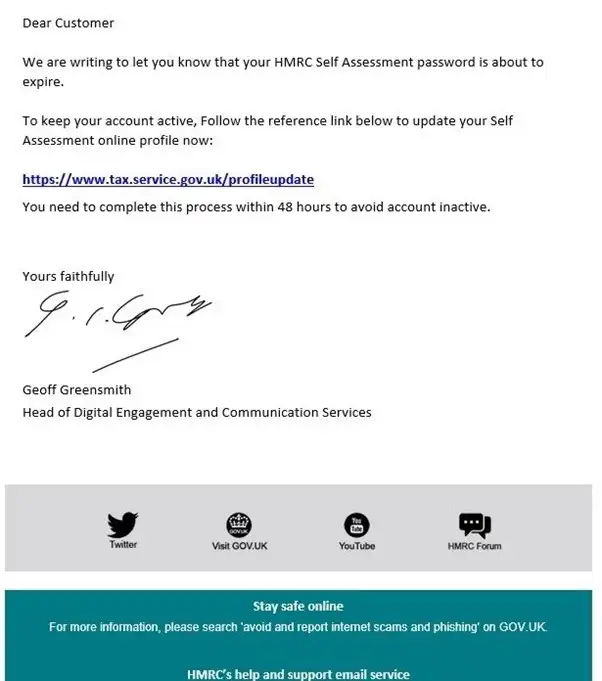
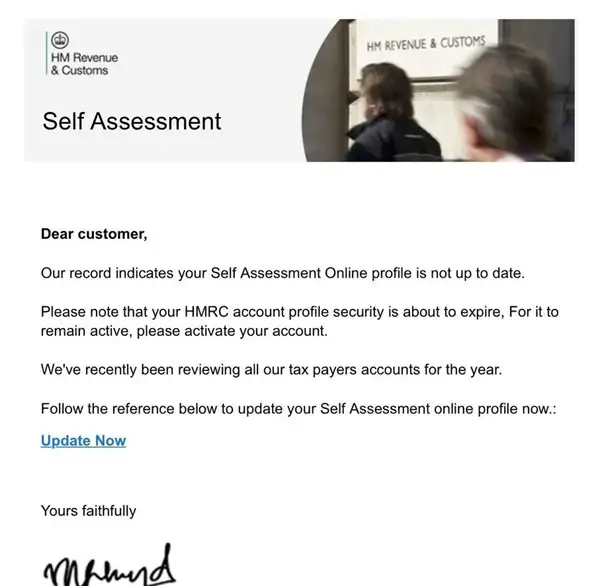
However, there are usually warning signs that can help you identify a fraudulent email:
- The greeting is generic – instead of addressing you by name, the email simply refers to the recipient as “customer” or uses another vague term.
- Poor grammar or unusual formatting – scam emails often contain spelling mistakes, randomly capitalised words, or incorrect punctuation.
- Suspicious links – when you examine the link more closely, the website address does not match the official HMRC website and may contain extra words, numbers, or unusual domain endings.
Being aware of these indicators can help you identify suspicious messages before they cause harm.
Use the tips below to help recognise and avoid email scams.
1. Check the sender’s email address
Scam emails are often sent from suspicious or unfamiliar email addresses. These addresses may contain random letters, numbers, or unusual wording that has no clear connection to the organisation the sender claims to represent.
To check whether an email is genuine, you can look more closely at the sender’s details. By hovering your cursor over the sender’s name, or right-clicking on it, most email services will display the actual email address behind the message. If the address does not match the official domain of the organisation, this can be a strong indication that the email may be fraudulent.
2. Is the greeting impersonal?
Some fraudulent emails may include your name at the beginning of the message, but many do not.
In many cases, scam emails use a very general greeting, such as simply saying “Hi”, or they may place your email address after the greeting instead of your actual name. This lack of personalisation can be a warning sign that the message has been sent out in bulk and may not be from a legitimate source.
If an email appears impersonal or oddly addressed, it is wise to treat it with caution and verify the sender before taking any action.
3. Check contact information and dates
Move your cursor over any area in the email where you would normally expect a link to appear.
For example, look at buttons such as “Contact Us” or links to terms and conditions that are often found at the bottom of messages. When you hover your cursor over these links, most email programs will display the web address they lead to. This allows you to check the destination without actually clicking on the link.
If the address looks unusual, misspelled, or different from the official website of the organisation, it may indicate that the email is not genuine.
It is also helpful to check dates and other details within the message. Scammers sometimes overlook small things like incorrect dates or outdated information, which can reveal that the email is fraudulent.
4. Check the branding
Pay attention to the quality of any logos or images included in the email. If the graphics appear blurred, pixelated, or poorly formatted, this may be a warning sign that the message is not legitimate.
It can also help to compare the branding in the email with the company’s official website or with genuine emails you have previously received from the organisation. Differences in logos, colours, layout, or overall presentation may suggest that the email has been created by someone attempting to imitate the company.
5. Check if the linked website is legitimate
If you have already clicked a link in an email because it appeared genuine, take a moment to verify that the website is legitimate before entering any personal information.
One way to do this is by using a domain lookup tool such as Who.is, which can show when a website was first registered. If the site was created very recently, this could be a warning sign that it has been set up for fraudulent purposes.
If the email claims to be from a well-known company or brand, it is safer to open a new browser tab and visit the organisation’s official website directly. You can then compare the web address and layout with the page you were directed to from the email.
If the email asks you to click a link to view an urgent message or alert on your account, avoid responding immediately. Instead, go to the company’s website yourself and log in to your account in the usual way. If there is no notification or message waiting for you, this may indicate that the email was not genuine.
6. Is the email asking for personal information or bank details?
If you receive an email asking you to update or confirm personal information or bank details unexpectedly, it should be treated with caution, as this is a common tactic used in scams.
Legitimate organisations rarely request sensitive information through email. In most cases, reputable companies will not ask you to provide personal or financial details in this way. If you receive such a request, it is best to contact the organisation directly using their official website or customer service channels to confirm whether the message is genuine.
7. Does it have poor spelling, grammar and presentation?
Scammers are becoming more skilled at creating phishing emails that appear professional and contain fewer spelling or grammar mistakes. However, it is still important to stay alert for common warning signs.
You may notice inconsistencies in the way the email is presented, such as different font styles or sizes being used throughout the message. In some cases, the email may also include a mixture of logos or branding that do not quite match each other. These small irregularities can indicate that the message has been put together quickly and may not be from a legitimate source.
8. Is it trying hard to be ‘official’?
Scammers often try to make fraudulent emails appear more legitimate by using language that sounds formal or official. For example, they may repeatedly use words like “official” or include statements intended to make the message seem authoritative.
In reality, genuine organisations rarely emphasise how “official” their communication is, as their branding and communication style usually speak for themselves.
Fraudulent emails may also include details such as reference numbers, account numbers, or identification codes to make the message appear authentic. If you see this type of information, it is a good idea to check it against your own records. If the details do not match, it may indicate that the email is not genuine.
9. Is it trying to rush you?
Scammers often try to rush you by using urgency, warning that you must act immediately or you’ll miss an “exclusive” offer or limited-time deal.
Don’t be pressured. Take a moment to carry out the checks you need. If the email claims to relate to an account you hold with a company, organisation, or retailer, open a new tab or window and log in via the official website or app, rather than clicking any links in the message.
It’s far better to miss a genuine offer than to take a risk with your personal or financial information.
10. Check with company, brand or department
If you are still unsure whether an email is genuine, contact the company or brand mentioned in the message directly. You can do this through their official website, social media channels, or by using the “Contact Us” section on their site.
It is also worth checking the company’s help or customer support pages, as many large organisations publish warnings and guidance about scams that are currently circulating.
Reporting Email Scams
If you receive a suspicious email, you can report it to help prevent others from becoming victims. In the UK, scam emails can be reported by forwarding the message to report@phishing.gov.uk.
You can also report suspicious emails to your email provider. For example:
- On Gmail, use the “Report Spam” option.
- On Hotmail/Outlook, select the “Report phishing” button.
- If you use Yahoo, you can forward scam emails to abuse@yahoo.com.
Reporting these emails helps authorities and service providers identify scams and take action to protect other users.
Staying Safe Online – Advice from Local IT Specialists
Email scams are becoming increasingly sophisticated, which means both individuals and businesses need to stay vigilant when checking messages and links. If you are unsure about a suspicious email, it is always best to pause before clicking anything and verify the source first.
At ILL IT Solutions, we regularly help local residents and businesses identify suspicious emails, remove malware, and improve their cyber security. Many phishing attacks target small businesses and home users who may not realise their systems have been compromised until personal information or login details have already been stolen.
As a local IT support and computer repair provider serving Chadwell Heath, Romford, and the surrounding East London and Essex areas, we recommend keeping devices updated, using reputable antivirus software, and seeking professional advice if you suspect your computer or email account may have been compromised.
If you ever receive an email that looks suspicious, avoid clicking links or downloading attachments. Instead, verify the message through the company’s official website or contact a trusted IT professional for guidance.
Need Help with Suspicious Emails or Computer Security?
If you are unsure whether your device has been affected by a phishing email, professional support can help you quickly identify and resolve the issue.
Getting help early can prevent data loss, identity theft, and further security risks.
